Best Free Gaming Video Editing Software

Recently, video clips and live streaming of games have taken over social media, making them a highlight of the digital entertainment world. And surprisingly, the craze is not confined to specific age users; instead, the game has become an integral part of their entertainment trail for users of all ages. With the rise of the gaming industry, editing gameplay videos has become an important skill that users are learning in order to reach out to their followers. If you record your gameplay with a screen recorder such as Bandicam, you may need to edit the videos to upload them to YouTube, Vimeo, Facebook, Instagram, etc. You can use a game editing program to save certain highlights of a game video and share them with your friends.
Best editing software for gaming videos plays a vital role in editing the recorded video gameplay on your PC. You cannot upload recorded raw files on your social media accounts, as you need to set video file size, fps, recording resolution, aspect ratio, and many other edits. Gaming video editor software swiftly performs these tasks within a few clicks, allowing you to share your live stream over your Facebook timeline or YouTube channel.
We picked the best editing software for gaming videos. This article will be beneficial for beginners and professionals alike. Let’s dive in!
1. Bandicut
If you want to work with versatile software, pick Bandicut. The software is widely known for cutting, joining, splitting, and trimming any video with standard quality pictures and sounds. Compatible with windows’ latest and previous versions, Bandicut can edit gameplay videos with primary and advanced editing options. You can try its free, accessible mode or upgrade to the pro version to unlock its premium features based on your requirements.
Bandicut Key Features
- The software offers to cut, split, join multiple videos, and make a single frame
- The tool supports various file formats so that you can save the edited files in your preferred format
- Bandicut supports the AV1 (Intel Quick Sync Video, AMD VCE/VCN) hardware encoder
- Bandicut allows users to set the playback speed of a video from 0.5x to 99.9x in Encoding mode.
- Making multiple edits over the raw file in high-speed mode does not affect its quality in the output files
- It can extract audio from video to convert it into an MP3 file
Pros
- Easy-to-use interface
- Bandicut can edit a video frame by frame
- It supports video rotation and flip features
- It never compromises video quality and standard
- Compatible with Windows 11, 10, 8, 7, and Vista
Cons
- It cannot be used on a Mac
- Not suitable for commercial video editing
Step 1. If you’ve recorded your gameplay with Bandicam, simply click the ‘Edit’ button to cut/trim/join the videos.
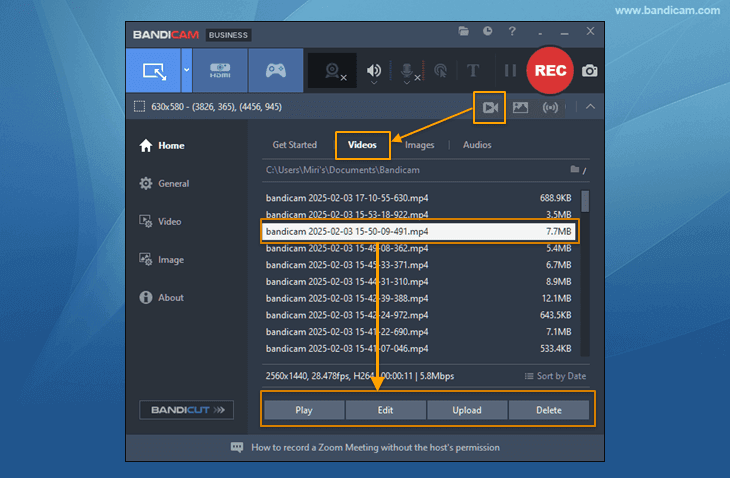
Step 2. You can cut, trim, or join your gameplay videos with Bandicut.
- If you click the edit button on Bandicam, the Bandicut program will open automatically.
- Move the slider to the desired beginning and end positions, and click the ‘Start’ button.
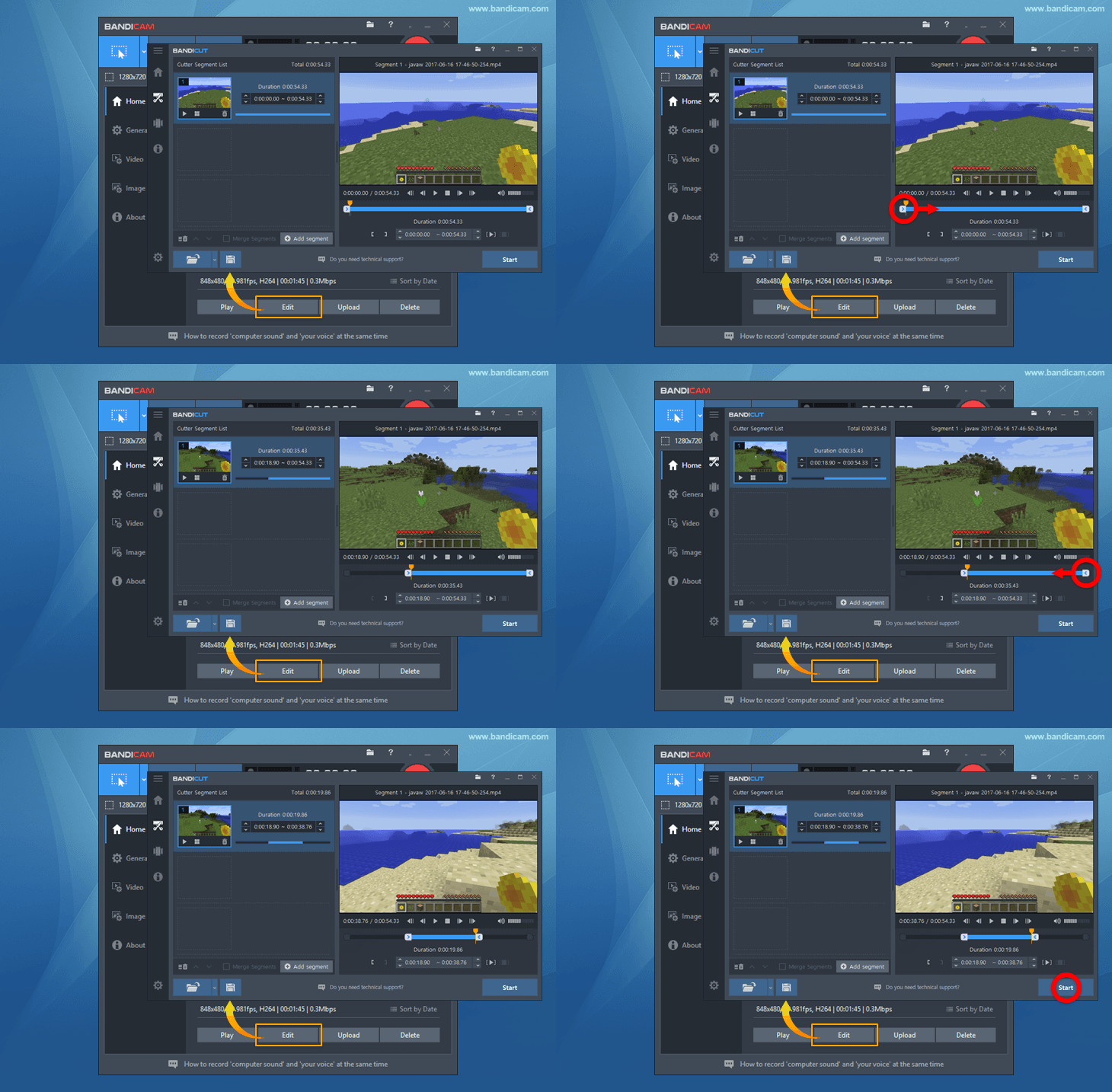
With these simple steps, you can simply edit your gameplay videos with Bandicut and upload them to YouTube or Vimeo. You can even compress videos before uploading them to social media.
2. DaVinci Resolve
DaVinci Resolve may end your search if you’re looking for a professional tool for high-end editing, with visual effects, color graphics, and motion graphics. The powerful tool DaVinci offers a wide range of editing experiments with your video and includes several layers that touch the glory of high professionalism. You can create visual effects from different camera angles to make your output file stylish and up-to-date. If you want to create a cinematic appearance for your gameplay video, you must try DaVinci Resolve.

Key Features
- The tool offers the most advanced NLE in editing option
- Its smart synchronization provides the perfect blend of cutting and joining video clips
- You can experiment with various color effects with the help of this tool
- Its Fusion option is optimal for advanced-level film and media technology
- The software offers third-party plugins and storage, including NAS and SAN systems
Pros
- Its editing style is based on a cinematic approach
- It’s a technically advanced tool that offers high-class editing
- The tool is recommended for pro users
- The tool works from simple editing to complex workaround
Cons
- Its inconsistent functionality is not straightforward for the beginner
- Expensive tool
3. Adobe Premiere Pro
Adobe Premiere Pro is another software that has already created a brand in the gaming editing software industry. If you have a creative urge to represent the game in a storytelling manner, Adobe Premiere Pro will help you in your stand. The software offers essential editing elements beyond cut, merge, and split.

Key Features
- Adobe Premiere offers animated graphics
- It offers a library full of creative assets like Adobe Photoshop, After Effects, and Frame. io etc
- The tool provides motion graphic templates
- Its VR Rotate Sphere stands for advanced editing techniques
- It offers high-class VR Audio editing components
Pros
- The tool offers balanced editing options for beginners and pro users
- The tool supports up to 8k resolution
- Speech-to-text facility is available
- The auto reformat video option is available
Cons
- The tool is subscription-based
- Without integration with other Adobe tools, you can’t use After Effects
4. Apple iMovie
Apple iMovie is one of the best editing software programs for gaming videos for iOS and macOS devices. The software offers cinema-quality editing options for your gameplay videos and allows you to upload them on social media. The creative editing components set your imagination to a new dimension.

Key Features
- The software offers primary editing options along with advanced options
- Its color modifications and enhancement options let you experiment with your imagination
- Cut, crop, rotate, speed-like basic editing options are available with the pro-pinch for final touch-up
- It can stabilize shaky videos
- It offers a video transition
Pros
- It offers green-screen controls
- It provides a wide range of filters
- You can create your own watermark
- Compatible with macOS and iOS
Cons
- High levels of space-consuming output files
- Not suitable for MP4 files
5. Wondershare Filmora
Empower your video gameplay with Wondershare video editing software. The software offers a great platform to build your editing skills, achieve your small yet powerful target, and share your growth story with community members. The software provides several avenues for learning with its customized editing components.

Key Features
- The software supports 4k resolution editing options
- It offers an audio equalizer
- It supports split-screen
- You can avail the video stabilization option
- Its color grading presets help you to set up customized color effects
Pros
- The tool supports GIF
- The tool is compatible with Windows, iOS, and Android
- It comes with a noise removal option
- The screen recording and detection option is available
Cons
- Expensive for personal use
- The graphical UI is not up to standard
6. Lightworks
For over 30 years, creators have depended on Lightworks for video editing and enhancing their skills up to the highest level. The video editing software offers a cinematic experience of editing and even engaging in a forum facility to exchange feedback and healthy discussions.

Key Features
- It offers color correction and blend modes to modify the look of the video
- Its drag-and-drop interface option is excellent for learners
- The tool supports Keyframe effects
- The Video Routing option is available
- Its content management drives you to create your own narratives
Pros
- It offers keyboard shortcuts
- Can work with multiple monitors
- A direct social media sharing option is available
- Compatible with Windows
Cons
- Not suitable for commercial purposes
- It has an archaic user interface
7. Openshot
If you’re looking for free gaming editing software, then pick OpenShot. The award-winning software is an open-source video editor compatible with Windows, macOS, Linux, and Chrome. Though it’s free software, it offers all the basic and advanced editing options for novice and pro users. The software is available in 172 languages and reaches out to a diverse range of users from different regions.

Key Features
- The software offers a robust animation framework
- It provides massive tracks that include background videos, audio tracks, a watermark, and many more
- Its video effects engine is vast and extensive
- The tool supports 3D animation
- Slow-motion and time effects options are available with Openshot
Pros
- It’s a Cross-platform video editor
- It offers excellent title editing options
- The tool is available in all the major international languages
- Simple and easy to use UI
Cons
- There’s a stability issue
- Hardware acceleration is low
8. Vegas Pro
Vegas Pro is a professional video editing software developed by Magix Software GmbH. This software provides a wide range of advanced features and tools for video editing, including multiple video and audio tracks, advanced color grading, visual effects, and compositing.

Key Features
- Vegas Pro offers advanced video editing tools that allow users to create complex video projects
- It has an audio editing feature that enables users to create professional-quality soundtracks and audio effects
- Users can edit footage from multiple cameras simultaneously
- It has a powerful color grading tool that lets users adjust the color and tone of footage for a more cinematic look
Pros
- Vegas Pro provides a wide range of features and tools for professional video editing
- Vegas Pro supports 4K resolution
- It offers noise-reduction tools
Cons
- Vegas Pro is one of the more expensive video editing software programs
- It may take time to start the Vegas Pro software due to its advanced features
Summary
If you go through the list of the best editing software for gaming videos, you’ll conclude that all of the tools are pretty helpful in editing performance, but some are especially advanced in their features. With these high-end tools, editing gameplay videos is an easy task you can perform to enhance your skill in gameplay video editing. You can share your final product on social media platforms to reach out to your friends and similar game-minded users.

11 Best Video Grabber: Bandicam (Win), Bandicam (Mac), Bandicut|SDKForumAbout UsBandicam + Bandicut discount package!
Sign in
Sign in
Welcome!Log into your account
your username
your password
Forgot your password?
Password recovery
Recover your password
your email
HomeNewsHow toReviewsTips
HomeReviewsTop 8 Free Gaming Video Editors of 2025
Reviews
Top 8 Free Gaming Video Editors of 2025
Best Free Gaming Video Editing Software
By
Bandicam Company
December 27, 2024
Free Gaming Video Editor
Recently, video clips and live streaming of games have taken over social media, making them a highlight of the digital entertainment world. And surprisingly, the craze is not confined to specific age users; instead, the game has become an integral part of their entertainment trail for users of all ages. With the rise of the gaming industry, editing gameplay videos has become an important skill that users are learning in order to reach out to their followers. If you record your gameplay with a screen recorder such as Bandicam, you may need to edit the videos to upload them to YouTube, Vimeo, Facebook, Instagram, etc. You can use a game editing program to save certain highlights of a game video and share them with your friends.
Best editing software for gaming videos plays a vital role in editing the recorded video gameplay on your PC. You cannot upload recorded raw files on your social media accounts as you need to set video file size, fps, recording resolution, aspect ratio, and many other edits. Gaming video editor software swiftly performs these tasks within a few clicks, allowing you to share your live stream over your Facebook timeline or YouTube channel.
We picked the top best editing software for gaming videos. This article will be beneficial for beginners and professionals alike. Let’s dive in!
- Bandicut
If you want to work with versatile software, pick Bandicut. The software is widely known for cutting, joining, splitting, and trimming any video with standard quality pictures and sounds. Compatible with windows’ latest and previous versions, Bandicut can edit gameplay videos with primary and advanced editing options. You can try its free, accessible mode or upgrade to the pro version to unlock its premium features based on your requirements.
Bandicut Free Download
Bandicut Key Features
The software offers to cut, split, join multiple videos and make a single frame
The tool supports various file formats so that you can save the edited files in your preferred format
Bandicut supports the AV1 (Intel Quick Sync Video, AMD VCE/VCN) hardware encoder
Bandicut allows users to set the playback speed of a video from 0.5x to 99.9x in Encoding mode.
Making multiple edits over the raw file in high-speed mode does not affect its quality in output files
It can extract audio from video to convert it into an mp3 file
Pros
Easy-to-use interface
Bandicut can edit a video frame by frame
It supports video rotation and flip features
It never compromises video quality and standard
Compatible with Windows 11, 10, 8, 7, and Vista
Cons
It cannot be used on Mac
Not suitable for commercial video editing
Step 1. If you’ve recorded your gameplay with Bandicam, simply click the ‘Edit’ button to cut/trim/join the videos.
Edit gameplay videos
Step 2. You can cut, trim, or join your gameplay videos with Bandicut.
If you click the edit button on Bandicam, Bandicut program will open automatically.
Move the slider to the desired beginning and end positions, and click the ‘Start’ button.
Edit gameplay videos with Bandicut
With these simple steps, you can simply edit your gameplay videos with Bandicut and upload them to YouTube or Vimeo. You can even compress videos before uploading them to social media.
- DaVinci Resolve
DaVinci Resolve may end your search if you’re looking for a professional tool for high-end editing, with visual effects, color graphics, and motion graphics. The powerful tool DaVinci offers a wide range of editing experiments with your video and includes several layers that touch the glory of high professionalism. You can create visual effects from different camera angles to make your output file stylish and up-to-date. If you want to create a cinematic appearance for your gameplay video, you must try DaVinci Resolve.
DaVinci Resolve
DaVinci Resolve
Key Features
The tool offers the most advanced NLE in editing option
Its smart synchronization provides the perfect blend of cutting and joining video clips
You can experiment with various color effects with the help of this tool
Its Fusion option is optimal for advanced level film and media technology
The software offers third-party plugins and storage, including NAS and SAN system
Pros
Its editing style is based on a cinematic approach
It’s a technically advanced tool that offers high-class editing
The tool is recommended for pro users
The tool works from simple editing to complex workaround
Cons
Its inconsistent functionality is not straightforward for the beginner
Expensive tool
- Adobe Premiere Pro
Adobe Premiere Pro is another software that has already created a brand in the gaming editing software industry. If you have a creative urge to represent the game in a storytelling manner, Adobe Premiere Pro will help you in your stand. The software offers essential editing elements beyond cut, merge, and split.
Adobe Premiere Pro
Key Features
Adobe Premiere offers animated graphics
It offers a library full of creative assets like Adobe Photoshop, After effects, and Frame. io etc
The tool provides motion graphic templates
Its VR Rotate Sphere stands for advanced editing techniques
It offers high-class VR Audio editing components
Pros
The tool offers balanced editing options for beginners and pro users
The tool supports up to 8k resolution
Speech to text facility is available
Auto reformat video option is available
Cons
The tool is subscription-based
Without integration with other Adobe tools, you can’t use After Effects
- Apple iMovie
Apple iMovie is one of the best editing software for gaming videos for iOS and MacOS devices. The software offers cinema-quality editing options for your gameplay videos and allows you to upload them on social media. The creative editing components set your imagination to a new dimension.
Apple iMovie
Key Features
The software offers primary editing options along with advanced options
Its color modifications and enhancement option let you experiment with your imagination
Cut, crop, rotate, speed-like basic editing options are available with the pro-pinch for final touch up
It can stabilize shaky videos
It offers video transition
Pros
Expensive for personal use
The graphical UI is not up to the standard
- Lightworks
For over 30 years, creators have depended on Lightworks for video editing and enhancing their skill up to the highest level. The video editing software offers a cinematic experience of editing and even engaging in a forum facility to exchange feedback and healthy discussions.
Lightworks
Key Features
It offers color correction and blends modes to modify the looks of the video
Its drag and drop interface option is excellent for learners
The tool supports Keyframe effects
The Video Routing option is available
Its content management drives you to create your own narratives
Pros
It offers keyboard shortcuts
Can work with multiple monitors
A direct social media sharing option is available
Compatible with Windows
Cons
Not suitable for commercial purposes
It has an archaic user interface
- Openshot
If you’re looking for free gaming editing software, then pick Openshot. The award-winning software is an open-source video editor compatible with Windows, MacOS, Linux, and Chrome. Though it’s a free software, it offers all the basic and advanced editing options for novice and pro users. The software is available in 172 languages and reaches out to a diverse range of users from different regions.
Openshot
Key Features
The software offers a robust animation framework
It provides massive tracks that include background videos, audio tracks, a watermark, and many more
Its video effects engine is vast and extensive
The tool supports 3D animation
Slow-motion and time effects options are available with Openshot
Pros